
Pinterest can send you steady traffic for months. Sometimes years.
But only if you keep feeding it. Fresh pins, every week, on the right boards, with titles people actually search for. Do that by hand and it eats your whole Saturday.
So in this guide I'll walk you through how to automate your Pinterest marketing, step by step. Planning boards, batching pins, letting AI write the titles, setting a posting rhythm and tracking what works. If you'd rather compare apps side by side first, here are the 12 best Pinterest scheduling tools in 2026.
Ready? Let's build the workflow.
Why Automate Pinterest at All?
Pinterest isn't like other social networks. A pin doesn't die after a day. People find it through search, save it, and come back to it later.
That's great news. It also means the work never really stops.
Most of that work is repetitive. Creating boards, writing descriptions, scheduling pins, finding good content to repin, following people in your niche. None of it needs your creative brain. It just needs to happen, consistently.
When you automate the boring parts, a few good things happen.
- You get more traffic. More pins with links back to your site means more chances for a click.
- You stay consistent. Pinterest rewards accounts that show up regularly, not ones that dump fifty pins once a month.
- You learn what your audience loves. With activity on autopilot, you can spend your time reading the results instead of producing them.
- You sell more. Pins with clear links and calls to action shorten the path from discovery to purchase.
Sound good? Here's how to set it up.
Step 1. Plan Your Boards Around Keywords
Automation can't fix a messy account. So start with structure.
Pinterest is a search engine first. People type things like "small balcony garden ideas" or "easy meal prep for work." Your boards should match those searches.
Make a short list of the topics your business covers. Then turn each one into a niche-focused board with a clear, keyword-rich name. "Home Ideas" is vague. "Small Living Room Decor Ideas" tells both Pinterest and the reader exactly what's inside.
A few tips that help.
- Type your main topic into the Pinterest search bar and note the suggestions that pop up. Those are real searches.
- Write a short board description using those phrases naturally.
- Keep each board focused. Ten tight boards beat one giant catch-all board.
- Look for active group boards in your niche where you can share pins too.
This step takes an afternoon. You only do it once.
Step 2. Batch Your Pins Instead of Making Them Daily
Here's the single biggest time saver. Stop making pins one at a time.
Pick one block of time each week or each month. Gather everything you want to promote, like blog posts, products, videos and offers. Then create pins for all of it in one sitting.
Each piece of content deserves more than one pin. Try different images, different headlines, different angles. One article might get three or four pins spread out over a few weeks. Pinterest likes fresh pins, and you'll quickly see which version gets the clicks.
Don't forget to mix in other people's content too. Repinning high-quality pins from your niche keeps your boards active and useful, and it's a lot less work than creating everything yourself.
Step 3. Let AI Write Titles and Descriptions
Writing pin copy is where most people burn out.
Every pin needs a title and a description. They should be unique, readable and stuffed with the right keywords without sounding stuffed. Do that for a hundred pins and you'll start writing the same sentence over and over.
This is exactly the kind of job AI is good at.
Feed it your niche keywords and the link you're promoting, and let it draft a fresh title and description for each pin. Then skim a few to make sure the tone fits your brand. You'll keep the quality and lose the grind.
What makes good pin copy? Keep the main keyword near the start of the title. Say what the reader gets. Add a short call to action in the description, like "Read the full guide" or "Shop the look." Simple works.
Step 4. Set a Natural Posting Cadence
Now for scheduling.
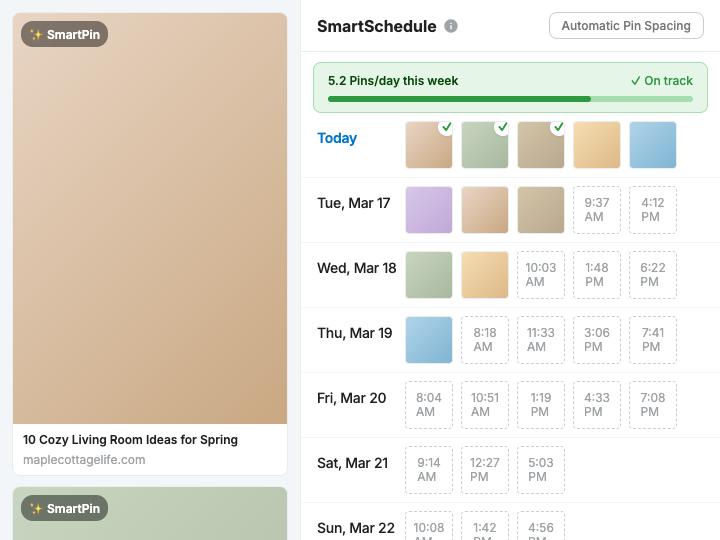
The goal is steady, spread-out activity. Not bursts. If you post twenty pins in five minutes and then go quiet for a week, you're working against yourself.
A good rhythm looks like this.
- Post a handful of pins every day rather than a pile once a week.
- Spread them across different boards so no single board gets flooded.
- Space them out through the day, when your audience is most active.
- Leave a gap before you pin the same link again.
How many pins a day? Start small and stay consistent. You can always scale up once you see results. Consistency matters more than volume.
Step 5. Automate the Engagement Too
Scheduling is only half of Pinterest automation.
Growing an audience also means finding good boards to follow, repinning quality content in your niche and keeping your following list clean. These little actions add up, and they're perfect for automation.
Just keep it human. Follow accounts that are relevant to your niche. Repin things your audience would genuinely want to see. Automation should do what you'd do yourself, only faster.
Step 6. Track What's Working
Once everything runs on its own, your job changes. You become the analyst.
Check your results every week or two. Which boards bring the most clicks? Which pin designs get saved? Which topics fall flat?
Then adjust. Make more of what works. Drop what doesn't. Try new headlines on content that's underperforming.
Pinterest Analytics gives you the basics for free. If your automation tool keeps an activity report, read that too, so you always know exactly what was posted and when.
How Pinflux Puts This Workflow on Autopilot

You can run every step above with a calendar app and a lot of patience. Or you can hand most of it to software.
That's why we built Pinflux. It's a Pinterest automation app for Windows and Mac that handles the daily work for you.
You connect your Pinterest accounts and boards, add a few keywords for your niche and set your schedule. Then it gets busy.
- AI writes a unique title and description for every pin.
- AI creates pin images when you need them.
- Posts are spaced out across boards and accounts so your activity looks natural.
- It finds quality pins and boards by keyword and repins the best content in your niche.
- It can follow relevant accounts and unfollow ones that don't follow back.
- You add your own links and calls to action to send traffic to your offers.
- A full activity report shows everything it did.
In other words, steps two through six on autopilot. You still plan the boards and read the results. Pinflux does the rest.
It costs $6.99 a month or $67 a year, and you can manage multiple accounts from one place.
Other Tools That Can Help
Pinflux isn't the only option, and some tools cover just one piece of the workflow. A few worth knowing about.
- Tailwind for scheduling with a visual calendar.
- PinGroupie for finding group boards in your niche.
- SweepWidget if you want to run contests and giveaways to boost engagement.
- Buffer and Later if you also manage other social channels.
For a full breakdown of features and prices, see our list of the best Pinterest scheduling tools.
A Simple Weekly Routine
Put it all together and your week can look like this.
- Once, plan your keyword-focused boards.
- Once a week, add new content and keywords to your automation.
- Every day, let your tool post, repin and engage on a natural schedule.
- Every week or two, check what's working and tweak.
That's maybe an hour a week. Instead of an hour a day.
Wrapping Up
Pinterest automation isn't about tricking the algorithm. It's about showing up consistently without burning out.
Plan your boards once. Batch your content. Let AI handle the copy. Keep a steady rhythm. And keep an eye on the numbers.
Do that, and Pinterest turns into one of the most reliable traffic sources you have.
Which step are you starting with? Let us know in the comments below.